
Deploying a high-throughput Linux VPS requires tuning kernel parameters, network buffers, and filesystem parameters. In this operational guide, we review Google BBRv3 congestion control, TCP socket buffer sizing, virtual memory swapping thresholds, and NVMe flash storage optimization for production web servers.
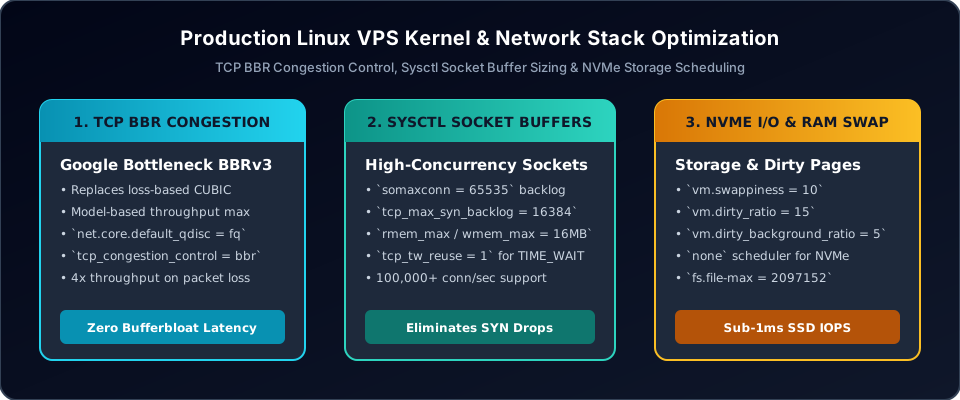
1. Activating Google BBRv3 Congestion Control
Traditional TCP congestion algorithms (like CUBIC) treat packet loss as the sole indicator of network congestion, causing throughput to collapse over transatlantic or cellular connections. Google BBR (Bottleneck Bandwidth and Round-trip propagation time) builds a dynamic physical model of the network pipeline, maximizing throughput while keeping queue delays near zero.
# Enable Fair Queuing and BBR in /etc/sysctl.conf
net.core.default_qdisc = fq
net.ipv4.tcp_congestion_control = bbr
To verify that BBR is actively loaded in the running Linux kernel, execute:
sysctl net.ipv4.tcp_congestion_control
lsmod | grep bbr
2. High-Concurrency Socket Buffer Tuning
To eliminate connection drops during traffic spikes, expand the socket listen backlog, connection tracking limits, and memory buffer allocations in /etc/sysctl.conf:
# Socket Backlogs
net.core.somaxconn = 65535
net.ipv4.tcp_max_syn_backlog = 16384
net.core.netdev_max_backlog = 16384
# TCP Buffer Allocations (Min / Default / Max in bytes)
net.ipv4.tcp_rmem = 4096 87380 16777216
net.ipv4.tcp_wmem = 4096 65536 16777216
net.core.rmem_max = 16777216
net.core.wmem_max = 16777216
# Socket Reuse & File Descriptors
net.ipv4.tcp_tw_reuse = 1
net.ipv4.tcp_fin_timeout = 15
fs.file-max = 2097152
These values ensure that the kernel can buffer large bursts of incoming HTTP/HTTPS connections without prematurely terminating handshakes or dropping SYN packets under peak concurrency.
3. NVMe Storage I/O & Memory Swappiness
For modern NVMe flash storage, kernel I/O queuing adds needless CPU overhead. Set the storage scheduler to none and tune dirty page flushing:
# Virtual Memory & Swappiness Tuning
vm.swappiness = 10
vm.dirty_ratio = 15
vm.dirty_background_ratio = 5
vm.vfs_cache_pressure = 50
Apply changes immediately without rebooting via sudo sysctl -p. For solid-state drives (SSDs) and PCIe NVMe block devices, verify the active scheduler by inspecting:
cat /sys/block/nvme0n1/queue/schedulerThe output should indicate [none] or [mq-deadline] to ensure low-overhead direct multi-queue hardware dispatch.
4. Systemd & PAM File Descriptor Limits (nofile)
A common failure mode on high-traffic web instances is the notorious socket: too many open files (errno 24). Even if fs.file-max is tuned to millions in sysctl, Linux processes are constrained by PAM user limits and Systemd service unit boundaries.
Configure persistent system-wide limits in /etc/security/limits.conf:
* soft nofile 65536
* hard nofile 1048576
root soft nofile 65536
root hard nofile 1048576
For services managed by Systemd (such as Nginx, Redis, or Node.js), edit the service unit override or /etc/systemd/system.conf:
[Service]
LimitNOFILE=65536
LimitNPROC=65536
Reload the systemd daemon with sudo systemctl daemon-reload and restart the service to apply the increased file descriptor limits.
5. Network Interface Tuning with Ethtool & Ring Buffers
Virtual server instances processing heavy network I/O can drop incoming packets before they reach the kernel network stack if interface ring buffers are set to default conservative values.
Use ethtool to inspect and maximize RX/TX ring buffers:
# Query maximum and current ring buffer sizes
sudo ethtool -g eth0
# Expand RX and TX ring buffers to device maximums
sudo ethtool -G eth0 rx 4096 tx 4096
# Verify hardware offloading features (TSO, GSO, GRO)
sudo ethtool -k eth0 | grep -E "tcp-segmentation-offload|generic-receive-offload"
Ensuring TCP Segmentation Offload (TSO) and Generic Receive Offload (GRO) are enabled allows the network card to aggregate packets, significantly lowering CPU interrupts on high-throughput workloads.
6. Empirical Benchmarking & Verification Suite
Validate kernel optimizations with empirical testing before and after applying changes. Execute these verified CLI tools:
# Test raw network throughput and latency across multiple TCP streams
iperf3 -c benchmark.winwinhost.com -P 8 -t 30
# Benchmark NVMe random 4K read/write IOPS and latency under direct I/O
fio --name=randwrite --ioengine=libaio --iodepth=64 --rw=randwrite \
    --bs=4k --direct=1 --size=2G --runtime=30 --numjobs=4 --group_reporting
# Monitor virtual memory, page faults, and context switches in real time
vmstat 1 10
# Audit disk I/O utilization and wait queues per device
iostat -xz 1 5
Frequently Asked Questions
Why is TCP BBR superior to Cubic on long-distance or packet-lossy links?
TCP Cubic assumes that packet loss indicates congestion and cuts the transmission window in half whenever a packet drops. Over transatlantic or Wi-Fi links where minor packet loss is routine, Cubic starves network throughput. BBR continuously measures actual round-trip time (RTT) and delivery rate, sustaining full line-rate throughput even with 1-2% background packet loss.
What does setting vm.swappiness = 10 do compared to 0?
Setting vm.swappiness = 0 aggressively prevents swapping until the system is entirely out of RAM, which can trigger the kernel Out-Of-Memory (OOM) killer prematurely during sudden memory spikes. A setting of 10 instructs the kernel to prefer reclaiming filesystem page cache while still allowing swap space to absorb transient memory spikes safely.
How can I verify that sysctl configurations persist across kernel reboots?
Store all configurations in dedicated drop-in files such as /etc/sysctl.d/99-custom-tuning.conf. When the server boots, systemd-sysctl.service loads all files in /etc/sysctl.d/ in alphabetical order, ensuring values are not overwritten by default distribution packages.
When should I choose mq-deadline over none for storage scheduling?
For enterprise PCIe 4.0/5.0 NVMe drives capable of hardware multi-queuing, the none scheduler delivers the lowest CPU overhead. For SATA SSDs or virtualized virtio block devices with shared storage arrays, mq-deadline prevents I/O starvation by enforcing bounded read and write request deadlines.
Summary & High-Performance Cloud VPS
Tuning the Linux kernel transforms a standard virtual instance into a high-concurrency engine capable of handling tens of thousands of simultaneous HTTP/HTTPS connections. By combining Google BBR, expanded socket buffers, tuned memory swapping, and proper file descriptor boundaries, cloud servers achieve maximum throughput with sub-millisecond response times.
High-Performance NVMe Cloud Servers
Deploy tuned Linux cloud instances powered by PCIe 4.0 NVMe storage, dedicated CPU cores, and premium Tier-1 network transit on WinWinHost.
Explore Cloud VPS Plans →