
Headless browser automation has historically been reserved for seasoned software engineers willing to write Puppeteer scripts, configure headless Chromium binaries, and manage complex serverless session pools. Cloudflare's Browser Run service unlocked powerful edge browser execution for developers, but it still requires writing custom TypeScript code inside Cloudflare Workers to capture screenshots or audit pages. At WinWinHost, we asked a fundamental question: what if non-technical website owners, digital marketers, and SEO specialists could leverage enterprise headless browser automation without writing a single line of code?
Through QA Watchdog, WinWinHost delivers fully managed, premade browser runs. Instead of authoring Playwright scripts, debugging CDP (Chrome DevTools Protocol) sessions, or managing memory limits, users trigger turnkey browser automation workflows with a single click or on an automated schedule. In this deep architectural review, we examine how QA Watchdog transforms complex browser automation into effortless site health monitoring, how our multi-node infrastructure prevents headless compute spikes from degrading production performance, and how our five premade run profiles protect organic search rankings and user experience across your portfolio.
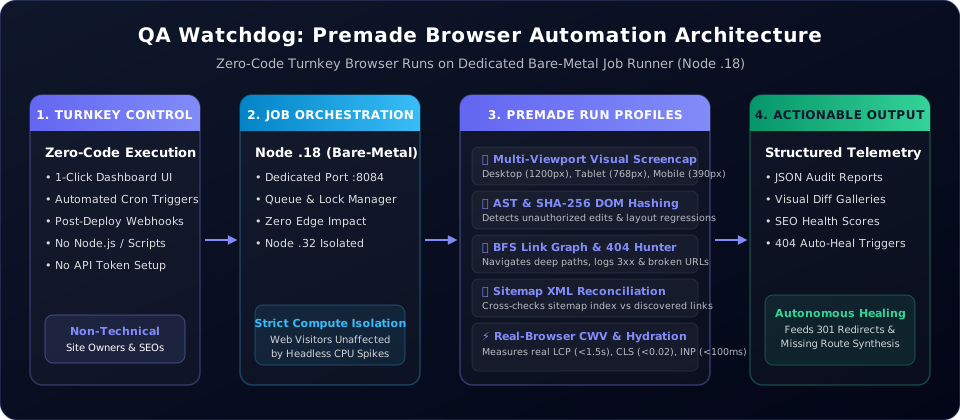
1. Cloudflare Browser Run vs. WinWinHost QA Watchdog
To understand the breakthrough of premade browser runs, consider how modern browser automation platforms operate. Cloudflare Browser Run is an impressive developer platform: it provides an ephemeral headless Chromium instance inside Cloudflare's network, which developers interact with using the @cloudflare/puppeteer package. However, turning that raw browser instance into an actionable audit system requires substantial software engineering:
- Script Authoring: You must write, test, and deploy custom JavaScript/TypeScript code to navigate pages, handle redirects, set viewports, and capture screenshots.
- Session Lifecycle Management: You must programmatically acquire browser sessions, handle timeouts, gracefully disconnect websocket pipes, and handle out-of-memory crashes.
- Storage & Diffing Pipelines: Cloudflare Browser Run only gives you the browser; you must build your own image storage (e.g. Cloudflare R2), DOM diffing algorithms, and notification dispatchers.
- High Barrier to Entry: For non-technical site owners, marketing managers, and small business operators, setting up a Cloudflare Worker project with Wrangler, TypeScript, and Puppeteer is completely inaccessible.
WinWinHost QA Watchdog was engineered specifically to bridge this gap. Rather than exposing an unconfigured browser API that requires coding, QA Watchdog packages headless Chromium into high-value, turnkey operational profiles that run automatically.
| Operational Capability | Cloudflare Browser Run | WinWinHost QA Watchdog |
|---|---|---|
| Target User Persona | Software developers & Workers engineers | Site owners, marketers, SEOs & DevOps |
| Coding & Setup Required | Mandatory (TypeScript, Puppeteer, Wrangler CLI) | Zero code (1-click turnkey premade runs) |
| Multi-Viewport Snapshots | Custom script required for each viewport | Turnkey Mobile, Tablet & Desktop captures |
| DOM Mutation & Hash Tracking | Must author custom DOM parsers & hashers | Built-in AST normalization & SHA-256 diffs |
| Link Graph Traversal (404 Hunting) | Must construct custom recursive BFS crawler | Turnkey graph spider with redirect tracking |
| Production Workload Isolation | Shared serverless pool with strict timeouts | Dedicated bare-metal Job Runner (Node .18) |
| Time to First Working Audit | Several hours to days of development | Under 30 seconds |
Browser automation should not require a computer science degree. By encapsulating headless Chromium into standardized, production-tested execution profiles, WinWinHost enables non-technical operators to audit, protect, and verify complex web applications with zero friction.
2. Dedicated Infrastructure: Decoupling Automation from Edge Traffic
Running headless browsers is notoriously resource-heavy. A single headless Chromium session rendering modern JavaScript applications, parsing WebGL elements, and rasterizing high-density full-page viewports can consume hundreds of megabytes of RAM and induce momentary 100% CPU spikes on multiple cores.
If you execute headless browser automation directly on your production web server, those CPU spikes directly steal compute cycles from incoming HTTP visitor requests. The consequence is immediate: Time to First Byte (TTFB) degrades, Server-Side Rendering (SSR) latency spikes from 15ms to over 800ms, and real visitors experience laggy page loads.
WinWinHost solves this architectural challenge through strict compute isolation across our physical cluster:
- Production Edge Ingress (Node .32): Dedicated exclusively to serving web visitors. Runs high-performance Nginx reverse proxies, Node.js Express SSR instances in Blue/Green configuration (
:8081and:8083), and database engines. Zero headless browser load is ever permitted on this server. - Dedicated Job Runner Node (Node .18): A dedicated bare-metal server (hostname:
logs) hosting the centralized Job Runner service (job-runneron port:8084). QA Watchdog spins up headless Chromium instances exclusively on Node .18, utilizing isolated worker pools with strict memory limits and process sandboxes.
Because the headless browser execution is completely decoupled from the production edge, you can run exhaustive multi-viewport audits and crawl thousands of URLs simultaneously without adding even a fraction of a millisecond to real user requests.
3. The 5 Premade Browser Run Profiles
Rather than asking users to write custom automation scripts, QA Watchdog organizes browser automation into five specialized, battle-tested execution profiles. Each profile is tuned for a specific aspect of site reliability and search visibility.
Profile 1: Multi-Viewport Visual Snapshot & Baseline Regression Tracking
Modern responsive layouts frequently break across specific viewport breakpoints when stylesheets are updated or dynamic components render unexpected content. In QA Watchdog, the Visual Snapshot profile renders your site across three standard viewports:
- Mobile Viewport: 390 × 844 px (iPhone 14/15 standard portrait)
- Tablet Viewport: 768 × 1024 px (iPad standard portrait)
- Desktop Viewport: 1200 × 800 px (standard widescreen desktop)
The headless browser disables active CSS animations and transitions, waits for web font rendering and hydration to settle, and captures full-height PNG snapshots. Successive runs compare captured screencaps against approved baselines, instantly alerting you if navigation bars wrap awkwardly, CTA buttons become obscured, or images overflow their containers.
Profile 2: AST Normalization & SHA-256 DOM Fingerprint Hashing
Visual snapshots catch rendering flaws, but what about subtle content regressions, accidental text truncations, or unauthorized template injections? QA Watchdog's DOM Fingerprint profile inspects the rendered HTML tree directly from the browser context.
The engine normalizes dynamic noise (such as timestamped query strings, ephemeral CSRF tokens, and third-party advertising iframes) and constructs an Abstract Syntax Tree (AST) of the primary content hierarchy. It then calculates cryptographic SHA-256 checksums across critical DOM nodes. If a CMS update accidentally removes an accordion section, drops structured schema markup, or alters pricing tables, the DOM fingerprint audit detects the exact node deviation and logs a human-readable diff.
Profile 3: Breadth-First Search (BFS) Link Crawler & 404 Hunter
Broken links are toxic to search engine crawl budgets and user conversions. Traditional static link checkers make raw HTTP GET requests against href attributes, completely missing links rendered via JavaScript, single-page application routers, or modal dialogs.
QA Watchdog's BFS Spider runs inside a real headless browser. It systematically discovers every navigable link on the page, captures 301/302 redirection chains, and evaluates response status codes. Any 404, 403, or 500 error is immediately flagged with its exact source page, CSS selector path, and HTTP referrer, providing the precise diagnostic data needed to repair the link before search bots downrank the URL.
Profile 4: Sitemap XML vs. Live DOM Link Graph Reconciliation
One of the most frequent technical SEO failures is the divergence between what is listed in sitemap.xml and what is actually linked within the site's navigation. This creates two severe problems:
- Orphaned URLs: Pages present in your sitemap that have zero incoming internal links on the live site, signaling low quality to search engines.
- Unindexed Content: Fresh articles or high-value landing pages linked from your blog archive that were omitted from the sitemap due to misconfigured generator plugins.
The Sitemap Reconciliation profile automatically parses your XML sitemap feeds, executes a live headless DOM crawl, and cross-references the two datasets into an actionable matrix showing exactly which URLs are orphaned or missing.
Profile 5: Real-Browser Core Web Vitals (CWV) & Hydration Profiling
Simulated HTTP response timings cannot measure how a website actually feels to a human visitor. QA Watchdog measures authentic browser rendering performance by attaching to the Chrome PerformanceObserver API during the headless run:
- Largest Contentful Paint (LCP): Tracks the exact timestamp when the main banner or hero text finishes rendering (target: < 1.5s).
- Cumulative Layout Shift (CLS): Measures unexpected layout shifts caused by un-dimensioned images or asynchronous banner loads (target: < 0.02).
- Interaction to Next Paint (INP): Profiles main-thread execution time and input readiness during hydration (target: < 100ms).
4. How Non-Technical Users Execute Premade Runs
Because QA Watchdog abstracts away all command-line scripting and browser configuration, utilizing these powerful automation tools is completely effortless for non-technical team members:
- 1-Click On-Demand Audits: In the WinWinHost management portal, select your target domain, choose the desired premade run profile, and click Run Audit. The request is queued and executed on Node .18 within seconds.
- Automated Cron Schedules: Set up recurring runs (such as nightly link checks or weekly visual baseline audits) without setting up Linux crontabs or server scripts.
- Deployment-Triggered Webhooks: Configure QA Watchdog to run a smoke audit automatically every time a new article is published or a theme update is committed.
When the run completes, QA Watchdog saves a comprehensive, structured JSON report (stored under /opt/job-runner/logs/reports/) and renders visual before-and-after side-by-side diffs right in the browser.
5. Summary & Next Steps
Browser automation is essential for maintaining enterprise-grade web applications, but requiring every website owner to become a Puppeteer engineer is an unnecessary barrier. With WinWinHost QA Watchdog, the power of headless Chromium is packaged into turnkey, premade browser runs that execute on dedicated, isolated bare-metal servers.
Whether you need to guarantee that your mobile checkout remains pixel-perfect, verify that internal links never break, or protect Core Web Vitals across a 50-domain portfolio, QA Watchdog delivers complete peace of mind with zero code required.