
部署公共 Linux VPS 时如果不进行防御性加固,上线几分钟内就会面临自动凭据填充、暴力破解扫描和权限提升攻击的风险。在本清单中,我们将实施一种 纵深防御 安全架构,符合互联网安全中心 (CIS) 1 级���准。
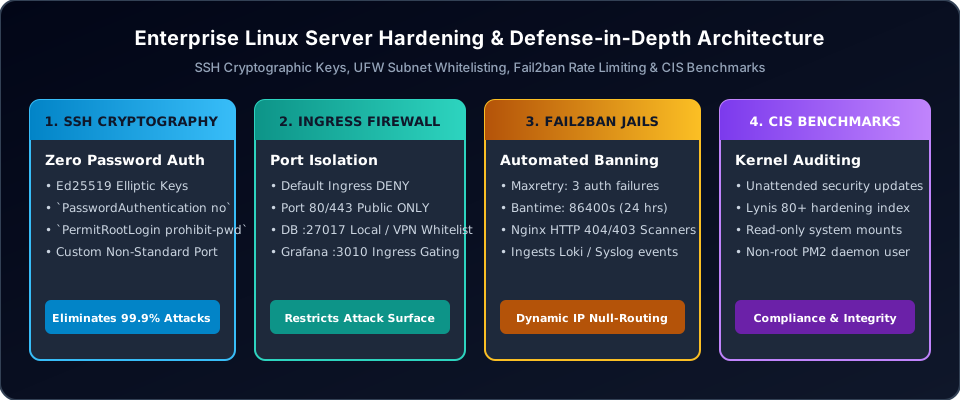
1. 第 1 步:强制使用加密 SSH 密钥
禁用所有基于密码的 SSH 身份验证,并强制使用现代椭圆曲线密钥,位于 /etc/ssh/sshd_config:
# /etc/ssh/sshd_config Hardening
PasswordAuthentication no
ChallengeResponseAuthentication no
PermitRootLogin prohibit-password
PubkeyAuthentication yes
X11Forwarding no
MaxAuthTries 3
ClientAliveInterval 300
ClientAliveCountMax 2
KexAlgorithms curve25519-sha256,curve25519-sha256@libssh.org
Ciphers chacha20-poly1305@openssh.com,aes256-gcm@openssh.com
MACs hmac-sha2-512-etm@openssh.com,hmac-sha2-256-etm@openssh.com
使用 ssh-keygen -t ed25519 -a 100 在本地工作站上生成密钥,并在通过以下方式重启 SSH 守护进程之前验证连接 sudo systemctl reload sshd.
2. 第 2 步:Uncomplicated Firewall (UFW) 入口隔离
执行严格的默认拒绝入口策略,仅暴露必要的公共 Web 服务:
# Reset and enforce default deny
sudo ufw default deny incoming
sudo ufw default allow outgoing

# Allow HTTP and HTTPS
sudo ufw allow 80/tcp
sudo ufw allow 443/tcp

# Restrict SSH to custom management subnet if applicable
sudo ufw allow 22/tcp

# Enable and inspect
sudo ufw enable
sudo ufw status verbose
3. 第 3 步:使用 Fail2ban 进行自动速率限制
配置 Fail2ban 以监控身份验证日志和 Nginx HTTP 错误流,通过 iptables 自动丢弃违规 IP 地址:
# /etc/fail2ban/jail.local
[DEFAULT]
bantime = 86400
findtime = 600
maxretry = 3
banaction = ufw

[sshd]
enabled = true
port = 22
filter = sshd
logpath = /var/log/auth.log

[nginx-botsearch]
enabled = true
port = http,https
filter = nginx-botsearch
logpath = /var/log/nginx/*error.log
maxretry = 2
4. 第 4 步:CIS 审计 & 无人值守安全升级
启用自动无人值守安全补丁并执行定期合规性审计:
# Enable automated security updates
sudo apt install unattended-upgrades update-notifier-common
sudo dpkg-reconfigure --priority=low unattended-upgrades

# Verify /etc/apt/apt.conf.d/50unattended-upgrades
Unattended-Upgrade::Allowed-Origins {
    "${distro_id}:${distro_codename}-security";
};
Unattended-Upgrade::AutoFixInterruptedDpkg "true";
Unattended-Upgrade::MinimalSteps "true";
Unattended-Upgrade::Automatic-Reboot "false";
5. 第 5 步:共享内存 & 文件系统挂载加固
获得受限 shell 访问权限的攻击者经常从全局可写目录(例如 /tmp 和 /dev/shm)执行恶意二进制文件。通过向 /etc/fstab:
# /etc/fstab Hardening
tmpfs /tmp tmpfs defaults,nosuid,nodev,noexec,mode=1777 0 0
tmpfs /var/tmp tmpfs defaults,nosuid,nodev,noexec,mode=1777 0 0
tmpfs /dev/shm tmpfs defaults,nosuid,nodev,noexec 0 0
添加防御性标志来保护这些挂载点。 noexec 标志可防止直接从该目录执行任何二进制文件或脚本,从而抵消常见的 Web 应用程序 shell 注入。
6. 第 6 步:内核自我保护 & 通过 Sysctl 实现网络安全
通过配置 /etc/sysctl.d/50-security.conf:
# Reverse Path Filtering (Mitigate IP Spoofing)
net.ipv4.conf.all.rp_filter = 1
net.ipv4.conf.default.rp_filter = 1

# Ignore ICMP Broadcast Requests & Smurf Attacks
net.ipv4.icmp_echo_ignore_broadcasts = 1

# Disable ICMP Redirect Acceptance (Mitigate Man-in-the-Middle)
net.ipv4.conf.all.accept_redirects = 0
net.ipv4.conf.default.accept_redirects = 0
net.ipv6.conf.all.accept_redirects = 0

# Prevent Rogue Source-Routed Packets
net.ipv4.conf.all.accept_source_route = 0
net.ipv4.conf.default.accept_source_route = 0

# Protect Hardlinks and Symlinks against TOCTOU Race Conditions
fs.protected_hardlinks = 1
fs.protected_symlinks = 1

# Maximize Address Space Layout Randomization (ASLR)
kernel.randomize_va_space = 2
来加固 Linux 网络堆栈,以抵御 IP 欺骗、SYN 泛洪攻击和 ICMP 重定向操纵。 7 7
. 第 步:使用 Lynis 进行自动合规性审计
# Install and run Lynis security audit
sudo apt install lynis
sudo lynis audit system --quick

# Review Lynis hardening index and generated warnings
grep "Hardening index" /var/log/lynis.log
grep "WARNING" /var/log/lynis.log
使用开源安全审计工具 Lynis 定期根据 CIS 基准审计系统合规性: 80
在生产 Web 托管环境中,目标是使 Lynis 加固指数得分达到 或更高。
常见问题解答 22
更改默认 SSH 端口 (2222) 是否足以保护服务器?
将 SSH 端口更改为非标准端口(例如 )可以减少访问日志中的自动机器人扫描,但这仅仅是“隐蔽式安全”。使用 Nmap 进行简单的端口扫描即可立即发现正在监听的 SSH 服务。强制使用加密密钥、禁用 root 密码登录以及 Fail2ban 速率限制才能提供真正的安全保障。
如何解封被 Fail2ban 意外锁定的管理员 IP 地址?
sudo fail2ban-client set sshd unbanip 203.0.113.50如果管理员输入了错误的凭据并触发了监狱封禁,请从辅助白名单 IP 或托管服务提供商的带外控制台连接,然后执行: ignoreip 您还可以通过将管理办公室 IP 子网添加到 /etc/fail2ban/jail.local.
指令中来永久将其列入白名单,该指令位于 1 2
CIS 基准 1 级和 2 级有什么区别?
CIS 2 级提供防御性安全控制,应用这些控制时破坏正常运行软件的风险极小。 级强制执行纵深防御措施(例如严格的强制访问控制策略、受限内核模块和激进的文件系统隔离),这需要定制应用程序调整以防止操作冲突。
为什么地址空间布局随机化 (ASLR = ) 至关重要? kernel.randomize_va_space = 2 设置
可以随机化堆栈、VDSO 页面、共享内存库和数据段的内存地址。这可以防止内存损坏漏洞(例如缓冲区溢出和面向返回的编程攻击)预测可执行内存目标。 & 总结
云安全基准
加固 Linux 服务器需要分层的防御姿态。通过实施加密 SSH 密钥对、严格的入口防火墙隔离、Fail2ban 入侵防御、受保护的共享内存挂载以及 CIS 基准审计,系统管理员可以确保生产实例能够抵御自动攻击。
部署预加固的云 VPS
在 WinWinHost 上部署内置 DDoS 过滤、NVMe 存储和隔离虚拟网络的加固 Linux 实例。 →